Why Your SaaS Website Gets Traffic but Not Demos, Signups, or Pipeline

Traffic Isn't the Goal. Pipeline Is.
Rankings are up and traffic is climbing. The analytics dashboard shows strong numbers in your board deck, yet the pipeline has not moved.
If that sounds familiar, your website isn't broken and you are not imagining the gap. You are dealing with a real, measurable mismatch between what your SEO strategy produces and what your business actually needs to grow. It is a frustratingly common problem for SaaS founders.
The latest data from Contentsquare's 2026 Digital Experience Benchmark Report puts a number on this. The average website converts just 2.35% of its visitors. That means most sites, even the ones sitting at the top of search results, turn only a small fraction of their traffic into meaningful business outcomes.
Standard SEO reporting rarely highlights the fact that traffic is merely a proxy metric. It is simple to track, looks great on a slide, and creates a sense of momentum. Pipeline is the actual engine that runs your business. When traffic goes up but revenue opportunities stall, it is easy to assume SEO simply doesn't work. In reality, the campaign is often working exactly how it was built, it just wasn't built for the goals you are trying to hit.
The core issue rarely comes down to poor writing. The true disconnect lies in what that content was designed to achieve and who it was targeting at each step of the buying journey. Let's look at how to bridge that gap.
The Eight Leaks Killing Your SaaS Pipeline
Traffic doesn't fail to convert for one reason. It fails for several, and they compound quietly, one ranking win at a time, until a quarter goes by and pipeline still hasn't moved. If you're asking why your SaaS SEO isn't driving pipeline despite the traffic gains, it's almost never one broken page. It's these eight leaks, most of them invisible until you know where to look.
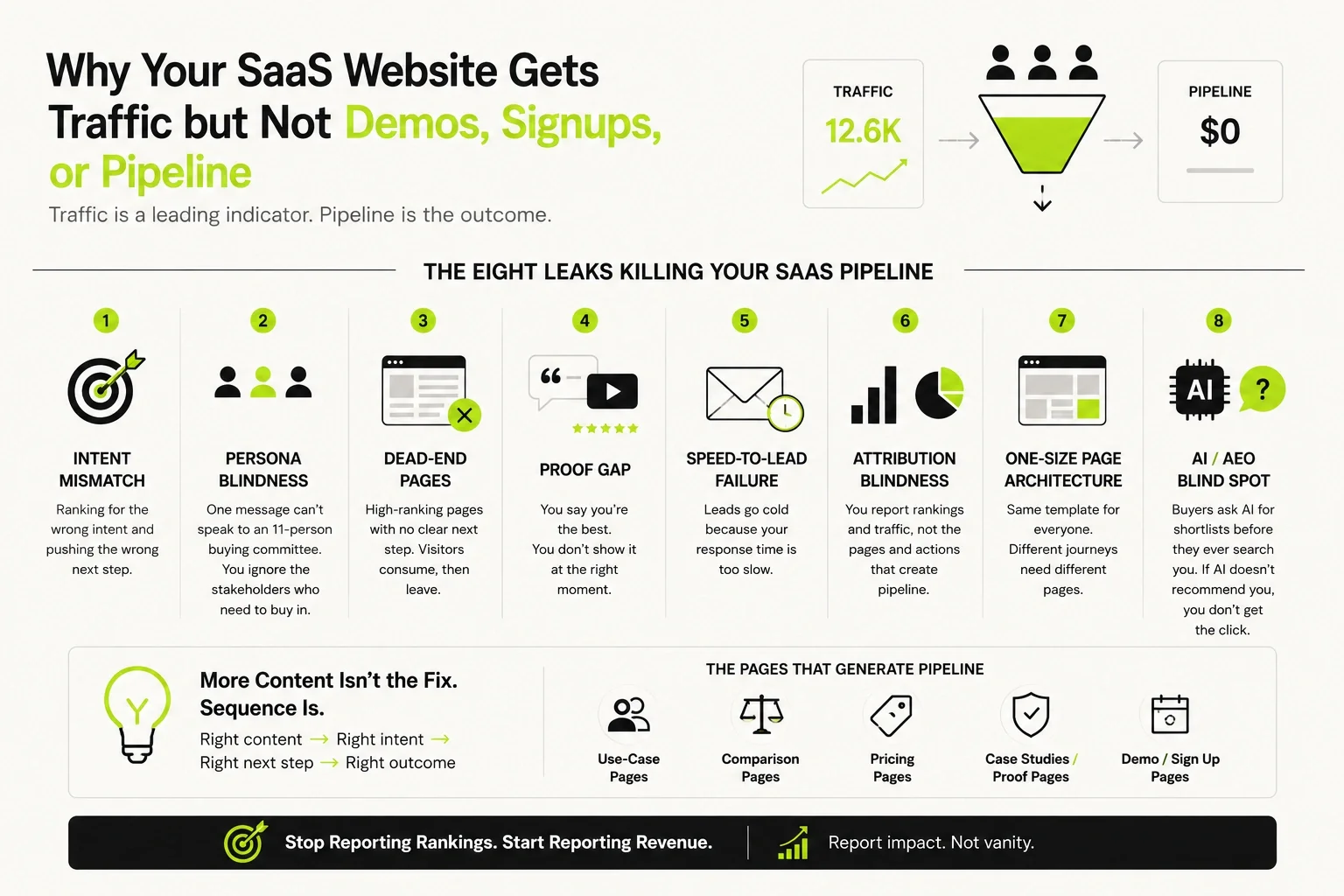
1. Intent Mismatch: Why SEO Traffic Doesn't Turn Into Demo Requests
Every search query carries an intent, and that intent tells you exactly what the reader is ready for. Most SaaS teams collapse all of it into one bucket - "keywords" - and send every visitor to the same "Book a Demo" button regardless of where they actually are.
There are five distinct intent types, and each one needs a different landing experience:
| Intent Type | What the Searcher Wants | Right Page to Send Them To |
|---|---|---|
| Informational | Understand a category or problem ("what is a CDP") | Educational blog post, no hard CTA |
| Commercial Investigation | Compare options, understand fit ("best CDP for e-commerce") | Comparison page or buyer's guide |
| Solution Evaluation | Confirm this product solves their specific problem | Use-case or feature page with proof |
| Comparison | Weigh you against a named competitor ("X vs Y") | Dedicated comparison page, honest and specific |
| Transactional | Ready to act ("[product] pricing," "[product] demo") | Demo or signup page, minimal friction |
Rank for an informational query and push a demo CTA, and you're asking someone who's still forming the question to commit to a sales conversation. They leave, and worse, they learn your CTAs aren't worth clicking. That training effect compounds across every future visit. This plays out constantly with real products: someone searching "what is a CDP" who lands on a page pushing a Segment demo booking bounces just as fast as someone pushed toward a hard sell for a tool they haven't even shortlisted yet.
One more shift worth naming: AI assistants like ChatGPT and Perplexity are now answering a growing share of commercial-investigation queries directly, before the searcher ever lands on a page. That doesn't remove the need for intent-matched pages, it raises the bar on them, since the pages that do get clicked need to earn that click by being clearly more useful than the AI summary.
2. Persona Blindness: One Page, Six Buyers, Five of Them Ignored
Most SaaS content assumes a lone reader, yet real business buying decisions are made by an entire committee. Gartner's latest research indicates that the average enterprise buying group now includes 11 distinct stakeholders, with each individual conducting independent research before the group ever meets - exactly the complexity our enterprise SaaS SEO work is built around.
In a typical mid-market SaaS deal, that group tends to break down like this:
Every single one of these professionals evaluates your website with a completely different set of anxieties. The champion wants to know the software solves their day-to-day bottleneck. IT needs to verify it will not break existing workflows. Security requires explicit data-handling documentation before offering an internal green light. Finance demands a rock-solid business case for the cost. A page written exclusively for the champion ignores the other stakeholders who have the power to stall or block the deal without ever raising an objection to the champion directly.
This reality is amplified by the fact that many of these stakeholders use AI tools to research your category before ever visiting your domain. Your content must be organized cleanly enough for an AI system to extract and summarize your technical specifications accurately on your behalf.
3. Buyers Never Reach Your Website
This is the leak that happens before any of the others get a chance to matter.
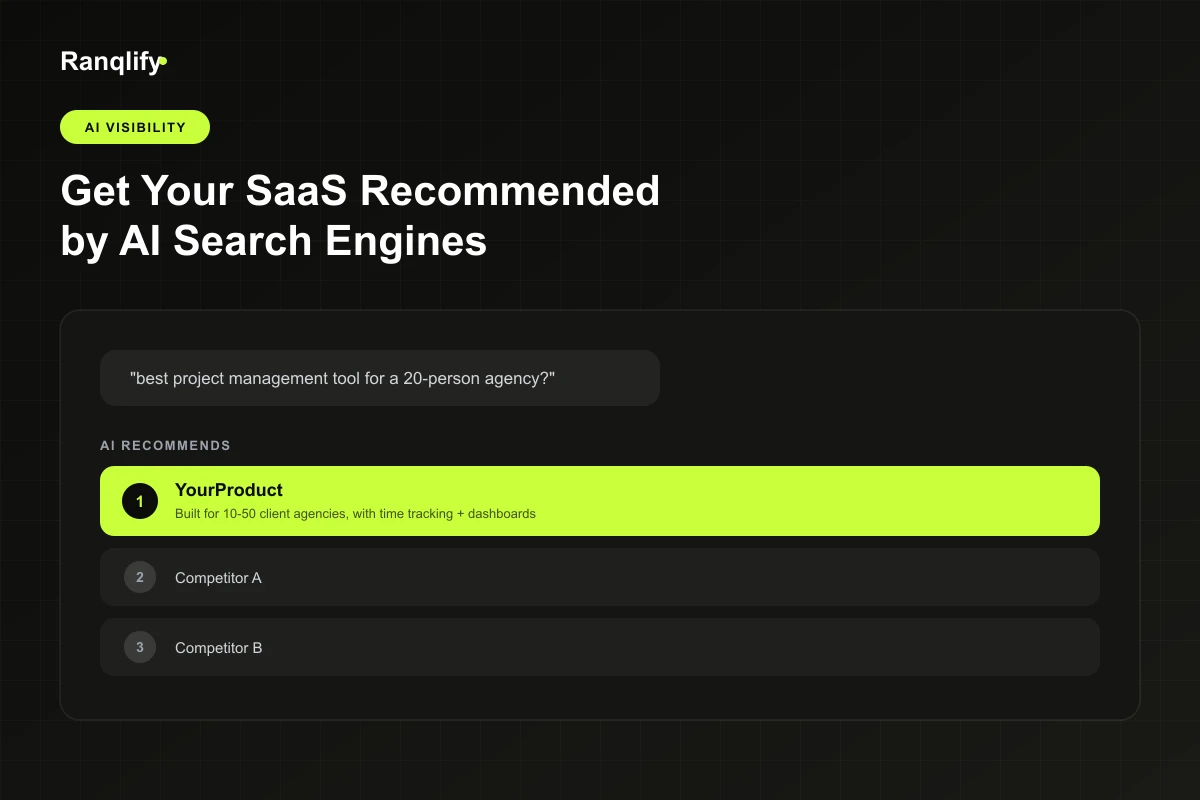
A growing share of SaaS research now starts and sometimes ends inside ChatGPT, Google's AI Overviews, Perplexity, Claude, or Gemini. Someone asks "best CRM for startups" or "[Competitor] alternatives," and the AI system answers with a shortlist, sometimes without a single click landing on any of the sites it's citing.
If your content isn't built around AEO for SaaS principles - structured in a way these systems can parse, extract, and trust - you don't lose the click. You never had the chance to earn it. This is a separate discipline from traditional ranking, and it's becoming a prerequisite for the rest of this framework to even apply.
4. Dead-End Pages
A high-ranking page with no next step is a page calibrated to nowhere. This shows up in a few specific, fixable ways:
- A comparison blog post with zero internal links to the product pages it's actually comparing
- A generic "Book a Demo" button sitting on a top-of-funnel article, with no contextual, intent-matched CTA in between
- A feature explainer that never links to the case study proving the feature works
- A page that ranks well and gets read fully, then simply ends
A comparison page like "Zendesk vs. Freshdesk" that ranks well but links to nothing beyond the homepage is a textbook version of this leak. None of these are content problems. They're architecture problems, and architecture problems are often the fastest ones to fix.
5. Proof Gap
By the time a technical evaluator or a finance stakeholder is reading your page, enthusiasm has stopped being useful to them. They're looking for specifics they can carry back into their own internal conversation. At minimum, that means:
ROI evidence, transparent pricing, third-party reviews, named case studies, security and compliance detail, integration documentation, migration and implementation specifics, support model, and a clear time-to-value answer.
Missing even one of these doesn't just slow a human reader down. It also gives AI systems summarizing your product less to work with, which means less confidence in how, or whether, they represent you when someone asks for a recommendation.
6. Speed-to-Lead Failure
Sometimes a high-intent lead does not die because of the page experience. It dies during the sales handoff. The foundational MIT and InsideSales.com lead response study remains a benchmark in sales research for a clear reason. It proved that the odds of successfully qualifying an inbound lead drop by 21 times when an organization's response time slips from 5 minutes to 30 minutes.
SEO performance frequently takes the blame for pipeline drops that actually happen long after a prospect hits submit on your form. No amount of brilliant content can salvage a sales team that responds a full business day late.
Know which leak is actually costing you pipeline?
We run this exact funnel diagnostic as the first step of every SaaS SEO engagement.
7. Attribution Blindness
Most teams report on what they can see, not on what matters. Here's the gap that creates:
| What SEO Reports Track | What the Business Actually Runs On |
|---|---|
| Rankings | Demo Requests |
| Traffic / Sessions | Trial Signups |
| Click-Through Rate | Product-Qualified Leads (PQLs) |
| Impressions | Sales-Qualified Leads (SQLs) |
| Keyword Volume | Pipeline |
| Backlinks | Revenue |
Without page-level goal tracking tied through to pipeline, a leak in the left column can run undetected for a full quarter while every number in the report keeps climbing.
8. One-Size-Fits-All Page Architecture
PLG (product-led growth, meaning users try and buy the product with little or no sales involvement), sales-led, and enterprise SaaS are different buying motions with different pages doing different jobs, and most sites run the same template across all of them. A self-serve PLG visitor wants a signup button and a free trial, fast - the exact motion PLG SEO for SaaS is built around. An enterprise buyer wants proof, security documentation, and a conversation before they'll commit to anything, exactly the territory enterprise SaaS SEO covers. Forcing both through an identical page structure with an identical CTA guarantees one of them converts poorly, frequently the higher-value one.
This split matters more now that AI search systems tend to favor feature pages, comparison pages, documentation, and integration pages over homepages when answering specific buyer questions, which means the page architecture decision is no longer just a UX call.
Each of these leaks is fixable on its own, most in an afternoon. The reason they often don't get fixed is that no one's looking for all eight at once, and that's the real argument for treating this as an ongoing system rather than a one-time audit. We'll get into what turning organic traffic into demos and signups actually looks like next.
Find Out Exactly Where Your Funnel Is Leaking
Before you fix anything, find out which of the eight leaks is actually costing you. You likely already have the data in GA4 and Search Console. It's just not organized by the right dimension yet.
Run this in four steps.
- 1
Segment organic traffic by page type, not in aggregate. Blog posts, comparison pages, use-case pages, and pricing pages behave completely differently. Blending them into one "organic traffic" number hides where the real problem lives.
- 2
Check goal completion by page type. Look at visitor-to-lead and demo-request rates for each page category separately. A blog post converting at 0.3% next to a comparison page converting at 4% tells you something specific. An average of the two tells you nothing.
- 3
Find where drop-off concentrates. Is it happening on the page itself, on the form, or is there simply no next step offered? Each points to a different leak. No next step means a dead-end page. High page views with no form starts often signals a proof gap or an intent mismatch.
- 4
Cross-reference against keyword intent. Pull the actual queries driving traffic to each page and check whether the ranking keyword matches the CTA on the page. This single check catches intent mismatch faster than almost anything else.
Fifteen minutes with this framework will, in many cases, tell you which one or two leaks are doing the most damage. That matters, because fixing all eight at once isn't realistic, and it isn't necessary. Once you know where you're actually losing demos and signups, turning that traffic into pipeline is a much narrower problem.
More Content Usually Isn't the Fix. Sequence Is.
Here's the instinct almost every SaaS team has when pipeline lags behind traffic: publish more. More blog posts, more volume, more keywords covered. It feels like progress because the traffic chart goes up. Often, it just adds to the gap you're trying to close, because volume doesn't fix a mismatch between intent and CTA.
More research-stage content mostly adds more visitors who were never close to booking a demo. The traffic chart looks better. The pipeline chart stays flat. Now there's a bigger gap to explain, not a smaller one.
The more reliable fix isn't volume, it's sequence: deliberately matching content type to funnel stage, in order, instead of publishing everything you can think of and hoping some fraction converts. Research-stage content earns the visit. Comparison and use-case content earns the consideration. Bottom-funnel pages earn the demo request. Publish out of that order and you tend to end up with a funnel that's wide at the top and thin everywhere else. Publish in that order and every new piece of content has a job to do, not just a keyword to rank for.
This is also where most SaaS teams realise they don't actually have a content plan, they have a content backlog. A backlog is a list of topics. A sequence is a system built to move a specific reader from first search to booked call, and that difference is what tends to separate traffic from pipeline.
The Pages That Generate Pipeline
Not every page type carries the same pipeline weight. In SaaS specifically, a handful of page types do most of the work. They work best when they're built as a connected system, rather than a list of one-off page types. Think of it as a single path a buyer moves along, not eight unrelated content requests on a roadmap:
Each stage hands the reader to the next one. Educational content earns the first visit. Use-case and feature pages confirm the product fits their specific problem. Industry and integration pages answer the questions specific to their world. Comparison and alternative pages help them choose between vendors. Pricing and documentation remove the last practical objections. Demo or trial is where the funnel is designed to end up. Miss a stage, and buyers either bounce to a competitor's page that does have it, or land on your demo CTA before they're ready and ignore it.
A few of the highest-leverage stages in that chain, in practice:
- Comparison and alternative pages. These capture buyers actively choosing between vendors, which puts them closer to a decision than almost anyone reading a blog post. A page like "Notion vs. Confluence" or "ClickUp vs. Asana" converts well because the reader has already decided they need a solution. They just haven't picked one yet.
- Use-case pages mapped to ICP segments. A generic "features" page speaks to no one in particular. A page built around a specific buyer's specific problem, in their language, does the work of pre-qualifying the visitor before they ever talk to sales.
- Integration pages. For SaaS specifically, "does this work with the tools we already use" is often the real blocker to adoption, ahead of price or features. These pages convert technical evaluators who are further along than their traffic volume suggests. For a tool like Zapier or Airtable, a clear answer to a single integration question often outweighs a dozen feature bullet points.
- Bottom-funnel category and alternative pages. Pages built for buyers who already know what category of tool they need and are now weighing specific vendors within it, the same job a page like "HubSpot vs. Salesforce" or "Slack vs. Teams" does for their categories.
Why do these outperform blog content specifically in SaaS, and not necessarily in ecommerce or local business SEO? Because SaaS buying cycles are longer, involve multiple stakeholders searching independently, and rarely resolve in a single session. A comparison page doesn't just convert the person reading it, it becomes the page that visitor forwards to the rest of the buying committee. That's a job a blog post structurally can't do.
This ecosystem also does double duty now. The same comparison and alternative pages that rank well in Google are also the pages AI systems pull from most often when someone asks "what's a good alternative to [product]." Build this structure once, and you're building for both.
Stop Reporting Rankings. Start Reporting Revenue.
Rankings and sessions are internal metrics for the SEO team. They're useful for diagnosing problems. They're not what a founder should be reviewing in a monthly update, because neither one tells you whether the business actually grew.
If your SEO reporting stops at rankings and traffic, you're not getting a pipeline report. You're getting an activity report. Here's the difference:
| What Gets Reported | What Actually Tells You the Business Grew |
|---|---|
| Rankings | Pipeline sourced and pipeline influenced by organic |
| Traffic / Sessions | Cost per opportunity, organic vs. paid |
| Click-Through Rate | Time-to-activation for organic-sourced signups |
| Impressions | Conversion rate by page type, not blended |
| Keyword Volume | Pages that produced closed-won revenue last quarter |
| AI Mentions / AI Overview Visibility | AI-referral traffic and demo requests sourced from AI assistants |
That last row is new territory for most SaaS reporting, and worth tracking deliberately rather than lumping into "other" traffic. Track how often your product is recommended inside ChatGPT or Google's AI Overviews, whether you're showing up in AI-generated comparisons, and how much traffic and pipeline is actually coming from those referrals. It's a small slice of the report today. It won't stay small.
The math on conversion is straightforward, and worth putting in front of a founder directly: doubling your visitor-to-lead conversion rate has the same pipeline impact as doubling your traffic, but without paying for the extra traffic. A lift in conversion rate improves the return on spend you've already committed. A lift in raw traffic just gets you more of the same conversion problem, at a higher volume. That's the real argument for treating conversion architecture as seriously as you treat rankings.
Run This 30-Minute Audit Before Your Next SEO Call
Whether you're evaluating your current SEO team, an agency, or your own in-house efforts, run this before the next check-in. It uses GA4, Search Console, and your CRM. Nothing else. Score each item honestly. This is meant to be screenshotted or printed and brought into the room.
- Commercial pages (comparison, use-case, pricing) rank on page 1 for their target keywords
- Comparison pages exist for your top 3–5 competitors
- "Alternative to [Competitor]" pages exist
- Pricing page is clear, indexed, and linked from your top-performing content
- Top-traffic pages have a CTA that matches the keyword's intent (no research-stage keyword paired with a demo-stage CTA)
- Trust signals (case studies, security detail, integrations) appear on the pages evaluators actually read
- No high-value pages are orphaned - every top page has internal links pointing to it
- Site content is structured for AI visibility, not just traditional rankings
- Your product is currently being cited in AI search results (ChatGPT, AI Overviews, Perplexity) for relevant queries
- CRM attribution is configured to trace organic leads through to closed-won
- Lead response time on organic demo requests is tracked, and sits under 5 minutes
- Someone on your team can immediately name the page that produced your last closed deal
This won't fix everything in thirty minutes, but it will tell you exactly which of the eight leaks to bring to your next SEO conversation, instead of walking in with only "traffic is up, pipeline isn't."
Frequently Asked Questions
Traffic Is a Leading Indicator. Build for the Outcome.
None of this means traffic doesn't matter. It's a leading indicator, and a useful one, but only if it's predicting the outcome you actually care about. When traffic and pipeline move together, keep doing what you're doing. When they diverge, the fix frequently isn't more content. It's fixing the sequence and the architecture underneath it.
One more thing worth sitting with: some of the leak now happens before a visitor ever reaches your website at all. Buyers are asking AI assistants for recommendations and getting answers without a single click. Which means the goal isn't just ranking on Google anymore, it's being the answer wherever your buyers are actually looking, across AI and traditional search alike.
If you want a second set of eyes on where your funnel is actually leaking, that diagnostic is exactly where we'd start.
- Traffic is a proxy metric - pipeline is the outcome that actually matters
- Eight leaks compound quietly: intent mismatch, persona blindness, AI invisibility, dead ends, proof gaps, slow lead response, attribution blindness, one-size-fits-all pages
- Fifteen minutes segmenting GA4 by page type usually reveals which leak is costing you the most
- Sequence beats volume - match content type to funnel stage, in order
- Comparison, use-case, and integration pages carry the most pipeline weight in SaaS
- Report pipeline sourced and influenced by organic, not just rankings and traffic
'/%3e%3ccircle%20cx='600'%20cy='400'%20r='380'%20fill='url(%23glow)'/%3e%3c!--%20a%20single%20article%20page:%20unmistakably%20'content'%20-%20headline%20+%20body%20copy%20--%3e%3crect%20x='380'%20y='110'%20width='440'%20height='580'%20rx='32'%20fill='%23FFFFFF'%20fill-opacity='0.05'%20stroke='%23FFFFFF'%20stroke-opacity='0.18'%20stroke-width='3'/%3e%3c!--%20headline%20bar%20--%3e%3crect%20x='430'%20y='176'%20width='340'%20height='42'%20rx='21'%20fill='%23C9FF3A'/%3e%3c!--%20body%20copy%20lines%20--%3e%3cg%20fill='%23FFFFFF'%20fill-opacity='0.4'%3e%3crect%20x='430'%20y='262'%20width='320'%20height='16'%20rx='8'/%3e%3crect%20x='430'%20y='304'%20width='290'%20height='16'%20rx='8'/%3e%3crect%20x='430'%20y='346'%20width='310'%20height='16'%20rx='8'/%3e%3crect%20x='430'%20y='388'%20width='250'%20height='16'%20rx='8'/%3e%3c/g%3e%3c!--%20paragraph%20break%20--%3e%3cg%20fill='%23FFFFFF'%20fill-opacity='0.4'%3e%3crect%20x='430'%20y='440'%20width='270'%20height='16'%20rx='8'/%3e%3crect%20x='430'%20y='482'%20width='300'%20height='16'%20rx='8'/%3e%3crect%20x='430'%20y='524'%20width='190'%20height='16'%20rx='8'/%3e%3c/g%3e%3c!--%20pen%20badge:%20writing%20/%20creating%20this%20content%20--%3e%3ccircle%20cx='770'%20cy='620'%20r='58'%20fill='%23C9FF3A'/%3e%3cpath%20d='M746%20646%20L792%20600%20L804%20612%20L758%20658%20L742%20662%20Z'%20fill='%230C0C0A'/%3e%3cpath%20d='M786%20606%20L798%20618'%20stroke='%23C9FF3A'%20stroke-width='6'%20stroke-linecap='round'/%3e%3c/svg%3e)